Guide
Wildcard Subdomains: When to Use Them
Understand when wildcard DNS is useful, when it creates review risk, and how to verify wildcard behavior before public launch.
This guide is for teams considering a wildcard record such as *.example.com for previews, tenant sites, short-lived environments, or user-specific spaces.
Wildcard DNS is powerful because it removes record creation from the critical path. It is risky because it can make accidental, low-quality, or unreviewed public surfaces easier to expose.
Pre-flight checklist
Before creating a wildcard, confirm:
- who is allowed to create hostnames under the wildcard
- whether every generated host has meaningful content
- whether HTTPS covers the wildcard safely
- whether staging and test hosts can be blocked from indexing
- how abuse, stale previews, and broken hosts will be cleaned up
If those controls are missing, a wildcard may solve DNS while creating a site-quality problem.
Who this is for
Use this guide when building:
- preview environments such as
branch-name.preview.example.com - tenant domains such as
team-a.example.com - temporary review apps
- controlled internal tools with a predictable naming scheme
1. Understand what wildcard DNS answers
A wildcard record can answer names that do not have a more specific record.
Type: CNAME
Name: *
Value: previews.example-platform.net
TTL: 300
That may make alpha.example.com and unknown-example.example.com resolve to the same destination.
Verify:
dig random-preview.example.com +shortExpected shape:
previews.example-platform.net.Field capture
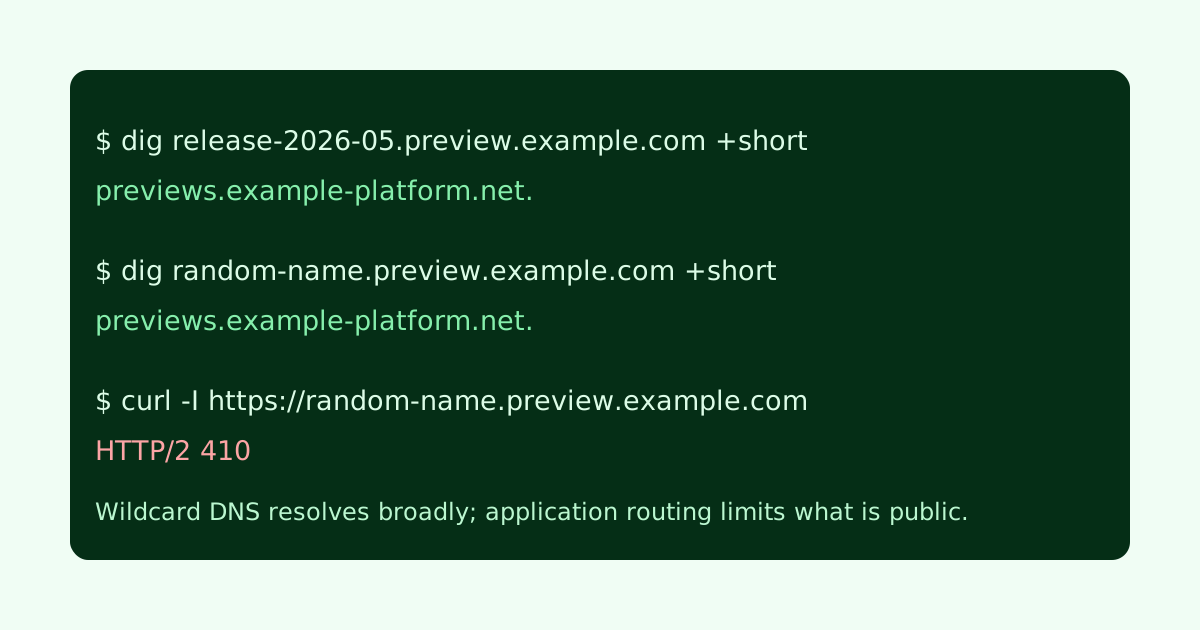
When reviewing a wildcard rollout, keep one intentional hostname and one random hostname in the evidence so you can see what the wildcard actually catches.
2. Separate DNS coverage from application routing
Wildcard DNS only sends traffic somewhere. Your application still has to decide whether the host should be served.
A safer app-level rule looks like:
const allowedPreviewHosts = new Set(["main", "release-2026-05"]);
const label = requestHost.replace(".preview.example.com", "");

if (!allowedPreviewHosts.has(label)) {
  return new Response("Gone", { status: 410 });
}
The goal is to avoid a world where every random hostname returns a thin 200 page.
3. Plan HTTPS deliberately
If many subdomains need HTTPS, you may need a wildcard certificate or a platform that handles certificates per hostname. Let’s Encrypt supports wildcard certificates through DNS-based validation.
The important review question is operational: who can issue, renew, and revoke coverage when the preview system changes?
Common failure cases
- Random wildcard hosts return 200 pages with placeholder content.
- Preview hosts remain public after the branch or project is deleted.
- The wildcard is indexed because pages return normal HTML without
noindex. - TLS covers the wildcard, but the app has no hostname allowlist.
- Teams use wildcard DNS to avoid deciding which names should exist.
Launch checklist
Before making a wildcard public, confirm:
- unknown hosts return 404, 410, or a protected response
- intended hosts serve real content
- preview or staging hosts emit
noindexwhen appropriate - TLS works for the intended hostname pattern
- cleanup is automated or scheduled
A wildcard can be a clean infrastructure tool. It should not become a shortcut for publishing unreviewed public inventory.
Manual review
Need a root-domain name reviewed?
and.guide reviews specific root-domain subdomain requests manually. Approval is limited, provisioning is never guaranteed, and honest project context matters more than speed.