Guide
How to Audit Indexed Subdomains Before Review
Audit public subdomains before an advertising or search review so staging pages, test posts, template demos, and server errors do not define the domain.
This guide is for operators preparing a root domain for advertising, search, or trust review while several subdomains have been used for experiments, staging, demos, or documentation.
The uncomfortable lesson is simple: a clean root site can still inherit a bad impression from broken public subdomains. If test pages, template demos, 500 errors, or staging products are discoverable, the domain can look unfinished even when the homepage is polished.
Audit checklist
Before submitting a site for review, check:
- all public subdomains you control
- indexed URLs for test, staging, demo, and old product paths
- server errors such as 500, 502, 503, and TLS failures
- pages with placeholder copy such as lorem ipsum
- whether unwanted pages return
noindex, 401, 403, 404, or 410 - whether the root sitemap includes only the pages you actually want reviewed
This is not glamorous work, but it is the work that keeps a domain from looking careless.
Who this is for
Use this workflow when:
- a site has been rejected for low-value or unfinished content
- old staging subdomains are still searchable
- a subdomain returns server errors
- a template demo is publicly accessible
- the root site says one thing while search results show another
1. Build a subdomain inventory
Start with the names you know:
www.example.com
docs.example.com
stage.example.com
fonts.example.com
api.example.com
Then check what search already knows. Search operators are not a complete crawl, but they are useful for discovering obvious leftovers:
site:example.com
site:example.com inurl:stage
site:example.com "lorem ipsum"
site:example.com "hello world"
Keep the results in a small sheet with columns for URL, status, desired state, and owner.
Field capture
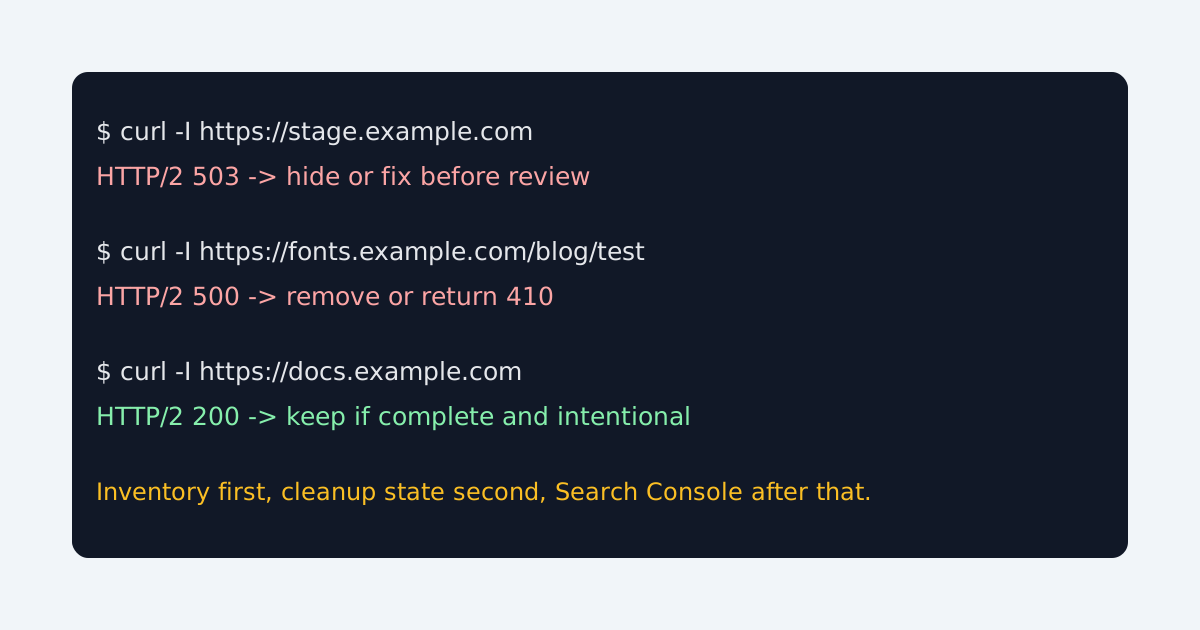
The most useful capture pairs a crawl status check with the cleanup decision. This prevents “we blocked it” from meaning five different things.
2. Check status codes directly
Use headers first:
curl -I https://stage.example.com
curl -I https://fonts.example.com/blog/test-post
Bad review signals include:
HTTP/2 500
HTTP/2 502
HTTP/2 503
These are not indexing strategies. They are broken public experiences.
3. Choose the correct cleanup state
Use the smallest honest response:
Finished public content:       200 + indexable + sitemap if core
Useful but not for search:     200 + noindex
Private staging:               401 or access control
Removed test/demo page:        410 Gone
Unknown old URL:               404 or 410
API endpoint:                  no HTML index surface
Robots.txt alone is not enough for already indexed HTML because a blocked crawler may never see the noindex directive. If a page needs to disappear from search, the crawler needs to access the page and see noindex, or the URL should be removed or return an appropriate removal status.
4. Rebuild the root sitemap
The sitemap should describe the surface you are proud to have reviewed. For a focused technical publication, that usually means:
- home
- guide library
- strong guide pages
- About
- Contact
- Editorial policy
- Privacy
- Terms
It should not include staging pages, request-only flows, admin routes, test posts, or pages that exist only to rescue an old URL.
Common failure cases
- A staging subdomain is protected by robots.txt but still appears in search snippets.
- A template demo returns 200 and looks like real site content.
- A test blog has titles such as “Hello world” and fails on article pages.
- The root About page says the site is focused, but search results show unrelated subdomains.
- Old sitemap submissions keep pointing crawlers at removed paths.
Re-review checklist
Before submitting again, confirm:
- broken subdomains are fixed, hidden, or removed
- placeholder pages no longer return normal 200 HTML
- unwanted indexed URLs have a cleanup plan
- the root sitemap contains only review-ready URLs
- Search Console has the current sitemap and removal requests where needed
The goal is not to pretend experiments never existed. The goal is to stop unfinished public inventory from becoming the domain’s first impression.
Manual review
Need a root-domain name reviewed?
and.guide reviews specific root-domain subdomain requests manually. Approval is limited, provisioning is never guaranteed, and honest project context matters more than speed.