Guide
Understanding DNS Propagation Time
DNS propagation is mostly about cache expiry, not mystery. Learn what really changes after a DNS update and how to verify progress without guesswork.

DNS propagation is mostly about cache expiry, not mystery. Learn what really changes after a DNS update and how to verify progress without guesswork.
This guide is for operators updating a public hostname and trying to understand why different networks still return different answers after the authoritative record has already changed.
When a manual review request says “we changed DNS yesterday and it still has not propagated,” the most useful next question is not “how long does propagation take?” It is “which cache is still serving the old answer?” Once you ask that, the problem usually becomes measurable instead of mysterious.
Pre-change checklist
Before changing a public record, write down:
- the old answer
- the new answer
- the current TTL
- which resolver or network you used for the last successful check
Without those four notes, teams often edit the record again just because one test machine is behind an old cache.
Who this is for
Use this guide if you are updating:
- a product hostname during cutover
- a docs or preview hostname during a deployment move
- a proxy status or DNS target in Cloudflare
- an integration endpoint that several networks may query differently
What actually changes when you update DNS
After you save a DNS change, three different things matter:
- the authoritative record is updated
- recursive resolvers keep using cached answers until their TTL window expires
- clients behind those resolvers continue seeing whatever the resolver still believes
That is why one teammate can see the new target while another still gets the old answer from a different network.
TTL is the main control you have
A short TTL does not make the internet refresh instantly. It simply shortens the window during which caches are allowed to reuse the previous answer.
app.example.com. 300 IN CNAME new-target.example.net.With a TTL of 300, a resolver that cached the old answer can keep serving it for up to five minutes from the moment it learned it. That is much more actionable than vague “wait a day or two” advice.
Field capture
The cleanest propagation check is to compare two public resolvers and see whether they now agree on the new answer.
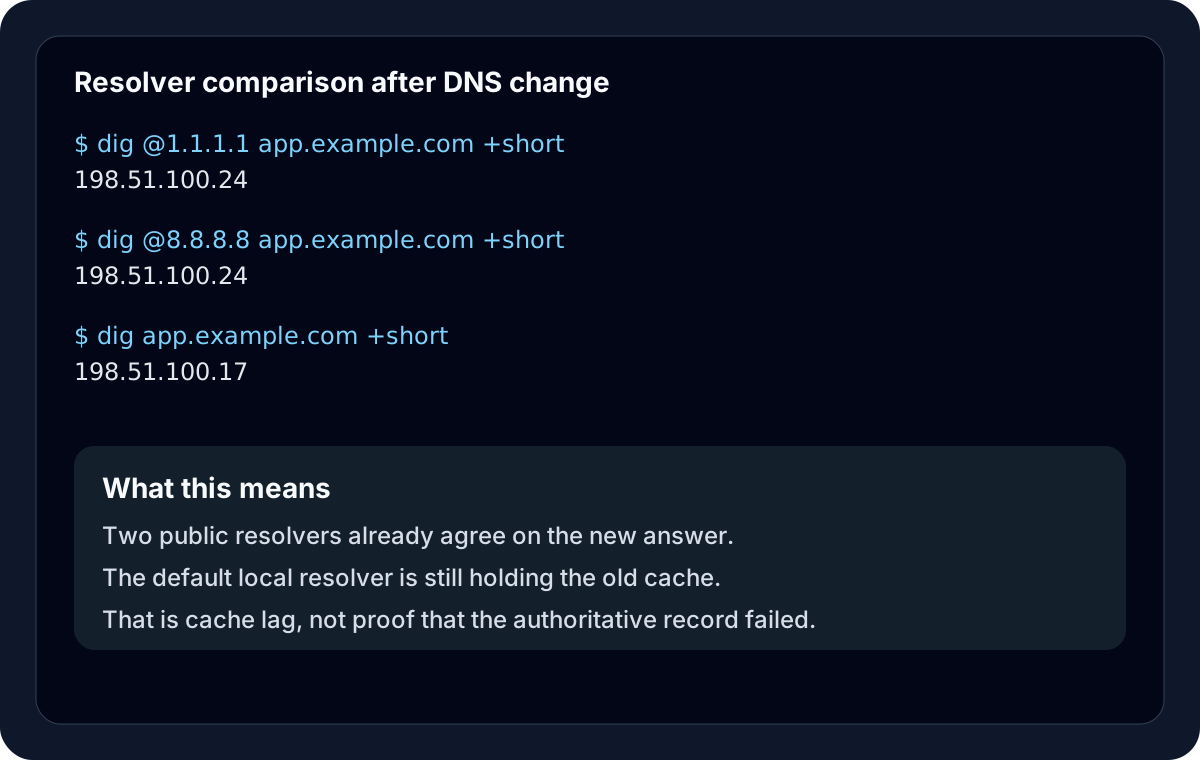
Command pattern that keeps the checks honest
Start with your default resolver:
dig app.example.com +shortThen compare two public resolvers explicitly:
dig @1.1.1.1 app.example.com +short
dig @8.8.8.8 app.example.com +short
If both public resolvers return the new answer and the browser still behaves strangely on one machine, the likely problem is a local cache or application behavior, not internet-wide propagation.
A safer rollout pattern
For planned DNS moves, use this order:
- lower the TTL ahead of the change if the current value is long
- wait for the previous TTL window to pass
- change the record
- verify with
digfrom multiple resolvers - confirm the public application response after DNS looks correct
This is the boring rollout pattern that makes DNS changes feel predictable instead of dramatic.
Failure cases that create fake propagation drama
The record was edited repeatedly
Someone makes the first change, gets impatient, edits it again, then a third person checks from another resolver. Now nobody knows which stale answer belongs to which edit.
DNS is already updated, but the origin or certificate is still wrong
Resolvers return the right destination, but the app still sends the wrong site, wrong redirect, or wrong TLS certificate. That is not a propagation problem anymore.
Only one network was ever checked
Testing only the office Wi-Fi or only a VPN path gives a distorted picture. Propagation is best confirmed by comparing at least two resolvers and one actual browser path.
A more realistic expectation
For standard subdomain updates with short TTLs, most visible changes should appear within minutes, not days. The old “48 hours” guidance is too blunt to be operationally useful for most modern managed DNS setups.
The better mental model is:
- the authoritative answer changes first
- caches catch up gradually
- the job is done when independent checks agree on the new answer
That framing keeps teams from turning a routine propagation event into a blind waiting game.
Manual review
Need a root-domain name reviewed?
and.guide reviews specific root-domain subdomain requests manually. Approval is limited, provisioning is never guaranteed, and honest project context matters more than speed.